Consignment History Tab: Consignment Status Changes
Purpose:
This article explains the Consignment Status Changes in the History tab of every consignment.
-------------------------------------------------------------------
This section is used to display the statuses that this consignment has acquired at various dates and times:
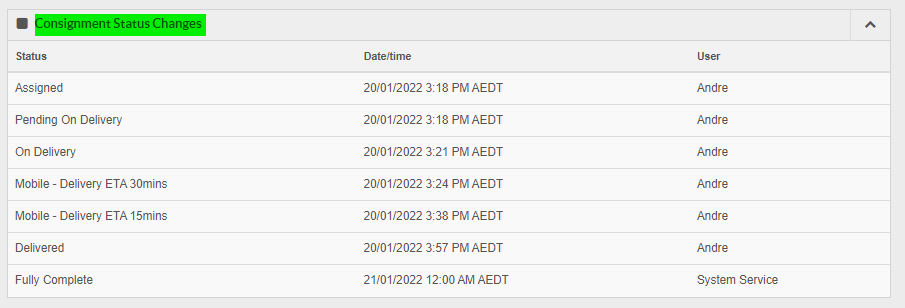
The statuses are listed in chronological order from top to bottom. In the above you can see that this consignment was not created as a pickup as there is no 'Pickup Received' status listed. The first status this consignment acquired after creation was 'Assigned'.
The Status column shows the status acquired.
The Date/Time column displays the date and time the status was acquired.
The User column displays the user that caused that status to occur for this consignment. In the above you can see that Andre triggered nearly all of these statuses as likely that user was delivering the consignment and the status was changing as that was happening.
The statuses are listed in chronological order from top to bottom. In the above you can see that this consignment was not created as a pickup as there is no 'Pickup Received' status listed. The first status this consignment acquired after creation was 'Assigned'.
The Status column shows the status acquired.
The Date/Time column displays the date and time the status was acquired.
The User column displays the user that caused that status to occur for this consignment. In the above you can see that Andre triggered nearly all of these statuses as likely that user was delivering the consignment and the status was changing as that was happening.
-------------------------------------------------------------------
FAQs
Q: Why do I see 2 different time events in that section?
A:There are times you will see 2 time zones displaying in this section like so:
This happens when the driver is in another time zone from the user viewing it.
In the sample above, the driver was in the Central AUS Standard Time zone and the user viewing it is in AUS Eastern Standard Time.